02a GPU Acceleration
The GUI can use optional PyTorch backends for selected NNMF and NNLS paths. If PyTorch or CUDA is not available, the analysis falls back to CPU implementations where supported.
For installation instructions, environment files, and platform-specific notes, see Installation – GPU notes.
What Can Use The GPU
GPU acceleration is currently relevant for:
- multiplicative-update NNMF through the PyTorch backend;
- batched fixed-H NNLS through the PyTorch/CUDA NNLS backend.
The coordinate-descent NNMF solver uses the scikit-learn CPU backend.
Backend Selection
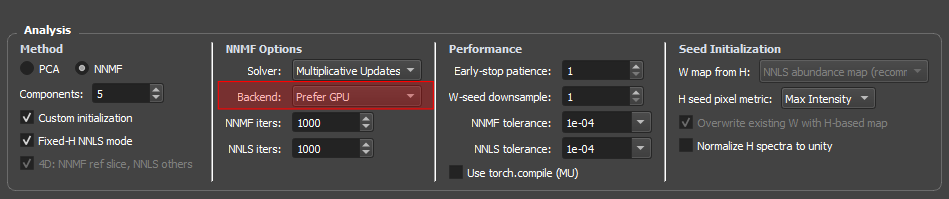
The analysis panel exposes a Backend dropdown for the PyTorch multiplicative-update NNMF path with two options (since v0.9.4):
- Prefer GPU (default): tries the first available accelerator in priority order CUDA > MPS > XPU. If no GPU is detected, falls back to CPU torch and logs the fallback.
- CPU only: skips the PyTorch MU path entirely and runs the scikit-learn MU NMF on CPU (not torch CPU). Useful for benchmarking, reproducibility against the scikit-learn reference, or when the GPU is busy with another job.
If PyTorch is not installed, the Backend dropdown is locked to CPU only — there is no torch/GPU path to choose, so the multiplicative-update NMF runs on scikit-learn. A machine that has PyTorch but no GPU keeps the dropdown enabled: Prefer GPU then runs a torch-CPU fit.
The Coordinate Descent (cd) solver always runs on the scikit-learn CPU backend regardless of the Backend setting.
The legacy Automatic item from v0.9.3 was removed in v0.9.4 because it had identical behavior to Prefer GPU. Presets saved as "auto" load as Prefer GPU automatically.
CUDA Requirements
For NVIDIA GPU acceleration, the important requirement is a CUDA-enabled PyTorch installation. In most cases, the full CUDA Toolkit is not required just to run the GUI. A compatible NVIDIA driver and CUDA-enabled PyTorch wheel/conda package are usually sufficient.
Check CUDA availability with:
python -c "import torch; print(torch.cuda.is_available()); print(torch.version.cuda)"
If this prints True, the PyTorch CUDA paths should be available to the GUI.
What To Report In A Paper Or Tutorial
When documenting an analysis, report:
- solver,
- backend,
- maximum iterations,
- whether fixed-H NNLS was used,
- whether GPU acceleration was available,
- final error or iteration summary when relevant.
This makes runtime and reproducibility easier to interpret.